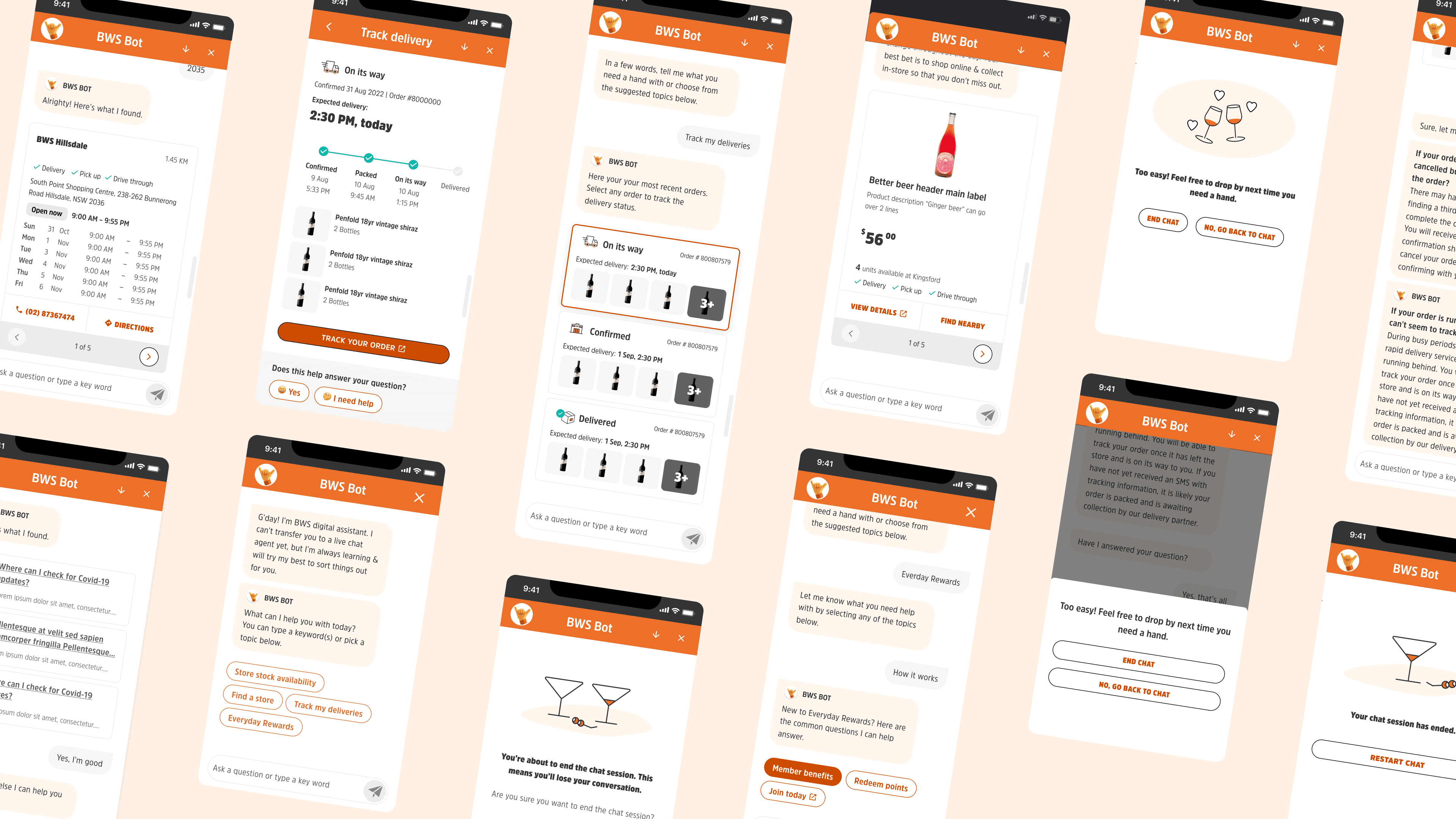
BWS Chatbot: Going beyond just FAQs
Designed the BWS chatbot to shift customers to self-service and cut support calls. Within three months it saw 116K sessions and delivered $202K in annualised savings.
The impact 🎉
The BWS chatbot was launched Nov, 2022 and is available on BWS web & app.

Within 3 months after the launch, it recorded 116K user sessions with an annualised savings of $202K. Stores also reported noticeable drop in call volumes to stores.
The project
Client: BWS
Industry: Retail, Ecommerce
Timeline: 3 months (2022)
My Role: UX lead, working closely with my UI partner
Help resources across the BWS digital ecosystem were scattered and hard to use, leading to customers calling stores & Customer Service for basic info like delivery times or store hours. This caused:
Long wait times (4 mins 23 secs) and slow ticket response time (2-6 days)
Heighten pressure on store and service teams
Higher service costs: 102k calls in FY22 (80% of all contact)
Store and service teams were overwhelmed with queries they weren’t equipped to handle, leading to inefficiencies, frustration, and occasional customer abuse.
3-pronged approach
Together with my UI partner, we devised 3 streams of work: a) scenario & intent mapping, b) UX pattern and heuristics, and c) brand & personality.
a). Scenario & intent mapping

Armed with data on contact volumes and staff feedback, we mapped the core scenarios where customers typically seek help. These led us to identify 5 key scenarios:
Order tracking
Store locator & opening hours
Product availability, pricing & stock check
Everyday Rewards
Delivery & returns
Each scenario and child intent was assessed based on customer value and business impact, helping us prioritise use cases for the MVP.
b). UX pattern & heuristics

Market scan and past chatbot research were conducted to reveal the following insights. These help guide us putting a bot together as the foundation:
Bot is there to help customers get unstuck AND complete a task.
Be upfront about what the bot can vs cannot do. Bot is only as helpful as its capability.
Preference over chatbot is influenced by users’ past experience with other bots.
Key UX areas to focus on to make a useful & usable bot.
c). Brand & personality

Collaborated with the in-house creative team to develop the chatbot’s personality, tone, name, and visual style. Moodboards were created for shaping the visual identity & sharing feedback. The tone builds on BWS brand traits and learnings from Dan’s Murphy—friendly, straight-up, and occasionally playful.
Designing for a bot intent

This was a time before ChatGPT and alike was widespread. Once everyone agreed on the prioritised bot intents, I mapped out the logic flow to stress-test and catch any blindspots in order to validate the natural pathways. This practice also put guardrails to guide user commands. Additionally, the logic tree revealed the 'stuck points' and challenged us to rethink "Can we prevent this? How can we reduce the work from users"?

Converted logic flow to an intent & script flow for ease of review & sharing. Experience for fallback & handoff was another critical piece in the bot UX, given that:
live chat wouldn’t be available as part of the launch,
and the business was hesitate to show contact number as the fallback response.
Shifting focus to the UX/UI
Once the team has a good idea on what the flow looks like, attention then shifted to the UX/UI. Low-fidelity mockup to show an idea & gather thoughts from team to form a tight feedback loop. We evaluated ideas against tech feasibility, customer value and overall ROI.
Using ‘Order tracking’ intent as an example, what we know about the customers:
They want to track WHERE their delivery is in real-time, not just when.
They identify their orders primarily by the products, not order number

Working closely with my UI designer, we identified and created design for all scenario within each intent - happy vs unhappy paths. For instance, within 'Track my deliveries':
the unhappy paths include 'Failed' and 'Cancelled' status for all order types
fallback handling: handle potential intents pre-emptively before handoff to human agents

In addition, leveraging previous UX insights, we presented past orders using product thumbnails in the visual load. We also emphasise order status, rather than order number as the card title since we don’t have real-time map tracking. Usage of visual indicators to boost perceived confidence of order status even though real-time location tracking is unavailable.
Same process repeated for the rest of the intents, with varying degree of complexity & review.
Final design
